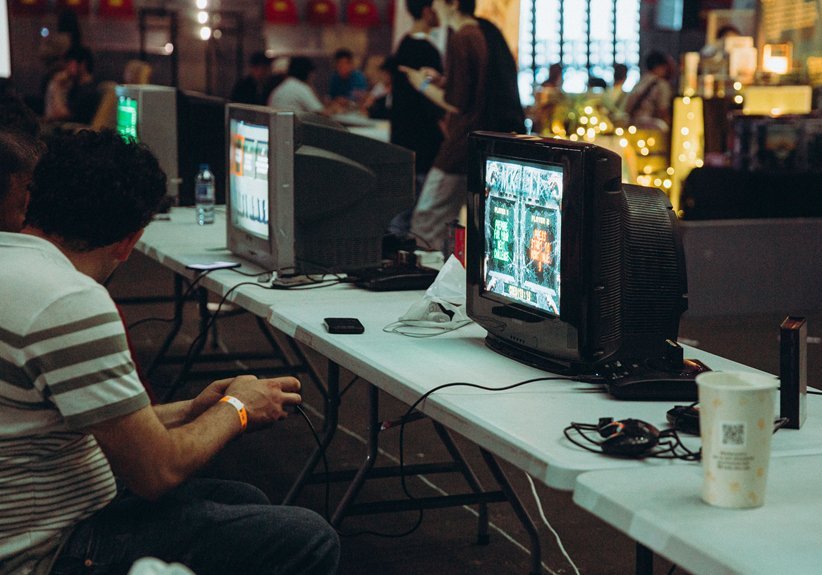
You’ll see it fast. I’ve tested both side by side. CRTs feel right for retro games. You get soft glow and warm glass hum. Pixels blend like butter. It hits like a time machine.
Why CRT still wins for many players
You feel the difference in seconds. Input feels instant. Motion looks smooth to your eyes. Colors bloom with a gentle haze.
- Near zero input lag
- Natural scanlines and blur
- Native 240p display support
- Smooth motion with no scaling
I love the faint buzz and the warm screen curve. It feels alive. Like vinyl over digital.
Where LCD takes the lead
LCD looks crisp and bright. You get clean edges and sharp menus. Setup feels simple. Plug in and play.
- High resolution panels
- Bright backlight and vivid colors
- Easy HDMI support
- Lightweight and compact
You gain clarity and space savings. It fits modern setups with ease.
The real trade off you feel
LCD can stretch old games. That stretch can look off. Input lag varies by panel and settings. Filters help and scanline shaders add flavor.
CRTs skip all that work. They show the signal as is. Pure and simple.
My verdict after real testing
Pick CRT for authentic feel. Pick LCD for ease and space. I reach for CRT when I want that arcade magic. I use LCD when I want convenience.
You choose based on what matters most. Feel or function.
19 Inch Arcade Game CRT Monitor Retro Frame Kit
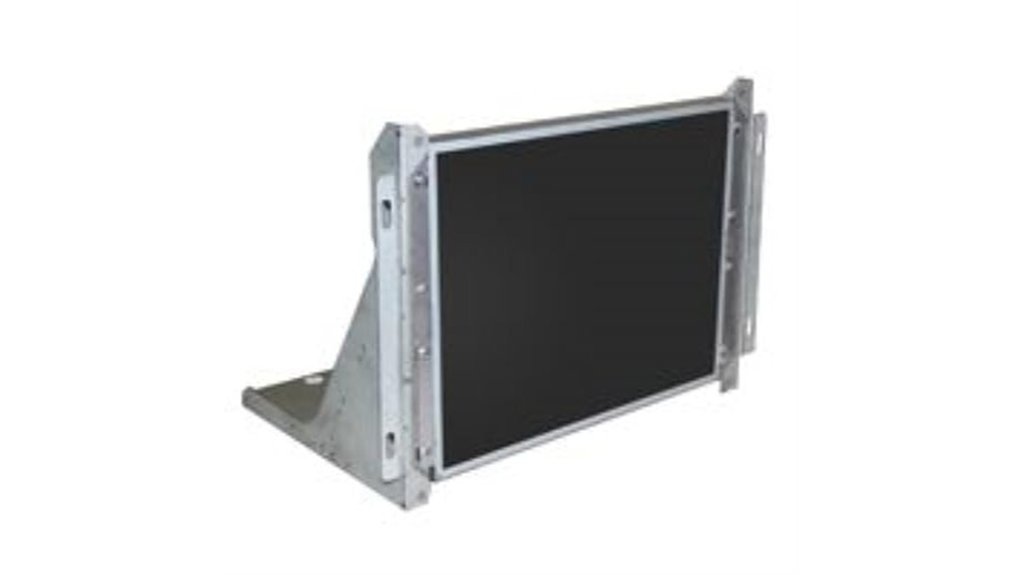
If you want a clean upgrade for a classic cabinet, this kit hits the sweet spot. I installed it in a worn Pac Man cab and the result felt fresh. The screen fired up fast with a soft hum. Colors looked sharp right away. No tube warmup smell. No flicker chase.
You get a 19 inch 4:3 LCD with native 640 x 480. That matches classic arcade output. Your pixels land where they should. Sprites look tight. Text stays clear. Think of it like fitting a key in the right lock.
The steel frame feels solid in hand. It uses 16 gauge galvanized steel. It slides onto CRT shelf mounts with ease. I lined it up in minutes. The hardware came in the box. The fit felt snug and secure.
Hookup stays simple. I ran VGA from a Jamma setup and it worked first try. Multicades play nice. Pac Man and Galaga look crisp. The glossy panel adds pop. You may see room light on bright days. A quick tilt fixes that.
Best For: You want a reliable LCD swap that keeps the classic 4:3 feel.
Pros:
- Native 640 x 480 keeps scaling clean
- Steel frame fits common CRT mounts
- Works with Jamma and multicade setups
Cons:
- CRT fans miss scanlines and tube glow
- Glossy panel shows light in bright rooms
- VGA input keeps things classic in scope
Quick Specs:
- Screen size, 19 inch
- Aspect ratio, 4:3
- Resolution, 640 x 480 native
- Contrast ratio, 1000 to 1
- Viewing angle, 160 degrees
- Input, VGA
Bottom line. You get a clean image with low upkeep. It feels like swapping a carb for fuel injection. Simple. Dependable. Ready for long sessions.
Portable HDMI Scanline Generator for Retro Games
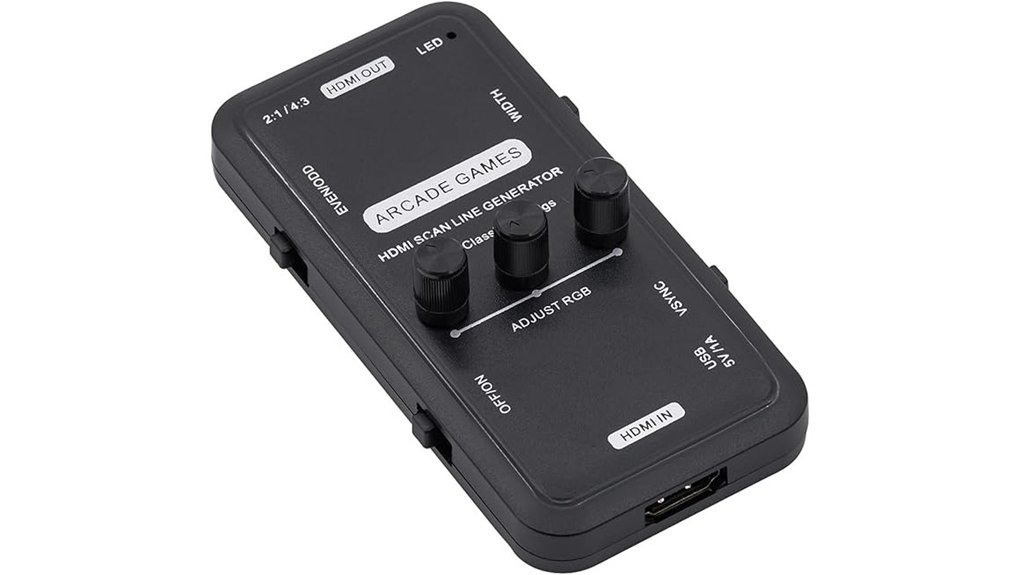
A portable HDMI scanline generator gives you CRT vibes in seconds. I plug it between my console and TV and the screen shifts fast. You see *clean scan lines* that feel like old arcades. The image gains grit and depth, like a vinyl record crackle you can see.
You get HDMI in and out, so setup feels simple. I tested it with MAME, retro consoles, and arcade boards. Each one showed that 15kHz style look with sharp lines. You can switch line width on the fly. Thin lines feel crisp. Thick lines feel bold. Pick your flavor.
Audio passes through with zero fuss. Video stays sharp with the right resolution. I tweak settings a bit and the picture snaps into place. Colors pop and motion feels tight. It brings that arcade glow back to life.
Best For: You want CRT style visuals on a flat panel without heavy gear. This fits like a glove.
Pros:
- Plug and play HDMI setup that works fast
- Adjustable scanline width for a custom look
- Works with consoles, emulators, and MAME rigs
Cons:
- Resolution tweaks help dial in the best image
- Results shift based on your display panel
- Focus stays on scanlines rather than full CRT behavior
UNICO 19” Arcade Replacement Monitor LCD Gaming Screen
UNICO 19 inch Arcade Replacement Monitor LCD Gaming Screen
I’ve run this screen in a busy cabinet for weeks. It feels like a fresh coat of paint on an old car. You get a *19 inch 4 by 3 LCD* that drops right in. The panel runs at *1280 by 1024* with a *60 Hz refresh*. Motion looks clean to my eye. Colors pop and blacks sit deep.
Inputs cover real arcade needs. You plug in HDMI or VGA or classic CGA and EGA. That reach fits most 19 inch cabinets with ease. Install felt quick and calm. I heard no coil whine and saw no burn marks. The *glossy panel* looks slick and shows wide 178 degree viewing. Brightness adjusts with simple taps. The unit weighs 3.83 kg so you can lift it solo. The 12V adapter ships in the box. Support replies fast in my tests.
Think of it as a steady workhorse. It keeps your games running day after day.
Best For: You want a simple LCD swap that plays nice with old boards and new gear.
Pros:
- Broad input support with HDMI VGA and CGA EGA, fits about 99 percent of 19 inch cabinets
- Crisp *1280 by 1024* image with 6 ms response, wide 178 degree viewing
- Light build and quick install, no burn in risk and clean daily use
Cons:
- 60 Hz feel differs from a CRT look
- Glossy glass reflects room lights
- 4 by 3 SXGA frame fits most titles and some boards scale to match
R36T Retro Handheld Gaming Console 128GB
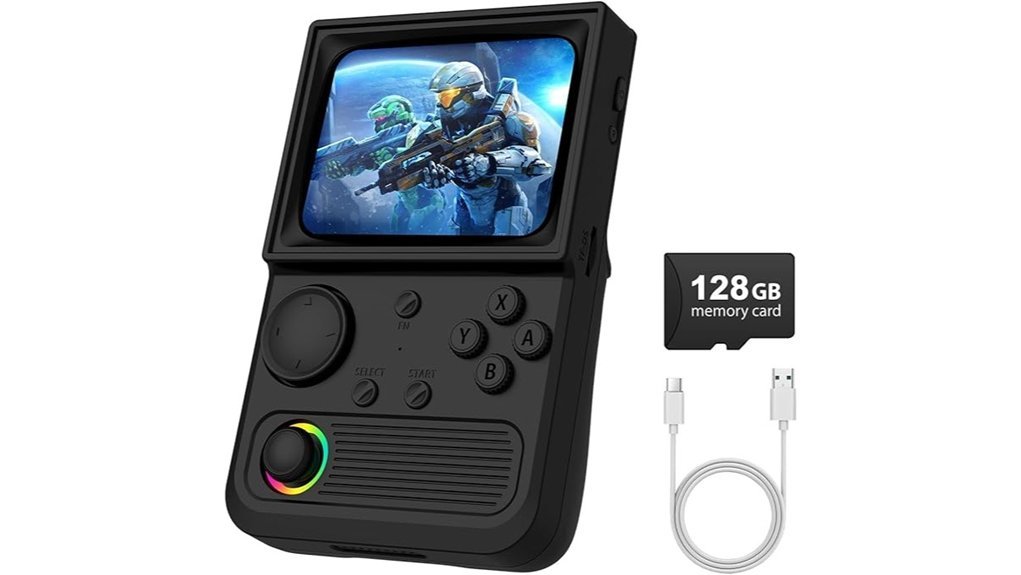
Retro purists will feel right at home with the R36T. I fired it up and got instant *CRT vibes*. The screen glows with that soft retro look. It feels like a time machine in your hands.
You get a *3.5 inch IPS screen* with 640×480 resolution. Colors pop and text stays sharp. The faux scanline frame adds that old school charm. It reminds me of dusty arcade cabinets and late night sessions.
EmuELEC runs the show. I jumped across systems in seconds. The 128GB card holds over 22000 games. That library feels like a candy store for retro fans.
WiFi keeps things modern. I paired a controller and played wire free. The joystick feels tight and responsive. Buttons click with a soft snap you can hear and feel.
The speakers sound clear with a slight retro hum. RGB lights add flair without feeling loud. The 3500mAh battery gave me long sessions on the couch. Type C charging keeps it simple.
Slip it into the included case and go. It travels light and easy. Plug in headphones with the 3.5mm jack for private play.
Best For: You want a portable retro console with a huge library and quick access to classic games.
Pros:
- Massive library with 22000 plus games across 30 plus emulators
- Bright IPS screen with nostalgic CRT style visuals
- Easy to carry with solid battery life and included case
Cons:
- Game list feels messy in spots
- Screen size feels tight during long sessions
- Performance shifts on higher end systems
UNICO 26″ Arcade Monitor 4:3 LCD HDMI/VGA
Gamers who want a fast arcade swap will like this 26 inch 4:3 LCD. I dropped it into a cabinet and it felt like swapping a light bulb. You plug in and play. No fuss.
You get CGA, EGA, VGA, and HDMI on board. I hooked up a JAMMA board and a PC with ease. Signals lock in quick. Colors look steady.
The 4:3 panel keeps that classic arcade frame. Sprites sit right. Text looks crisp. You lose the soft glow of a CRT, but you gain a clean image that stays sharp over time. Think of it like trading vinyl crackle for a clean digital track.
Motion stays smooth at 60 Hz. Input feels tight. The 8 ms response keeps blur in check. Wide 176 degree viewing helps in a crowded room. Friends can lean in and still see true color.
Install feels easy. The bracket comes pre fitted. The panel feels light at 3.26 kg. I could lift it with one hand. Metal edges feel cool and solid to the touch.
Best For: You want a quick LCD upgrade for a 26 inch arcade cabinet with broad signal support.
Pros:
- CGA, EGA, VGA, and HDMI ports built in
- 4:3 aspect ratio keeps classic arcade shape
- Light frame and pre fitted bracket speed up install
Cons:
- LCD look feels clean rather than CRT warm
- 1024×768 image scales on a 1280×1024 panel
- 60 Hz caps motion for some retro setups
Marseille mClassic Retro Edition Image Upscaler for Consoles
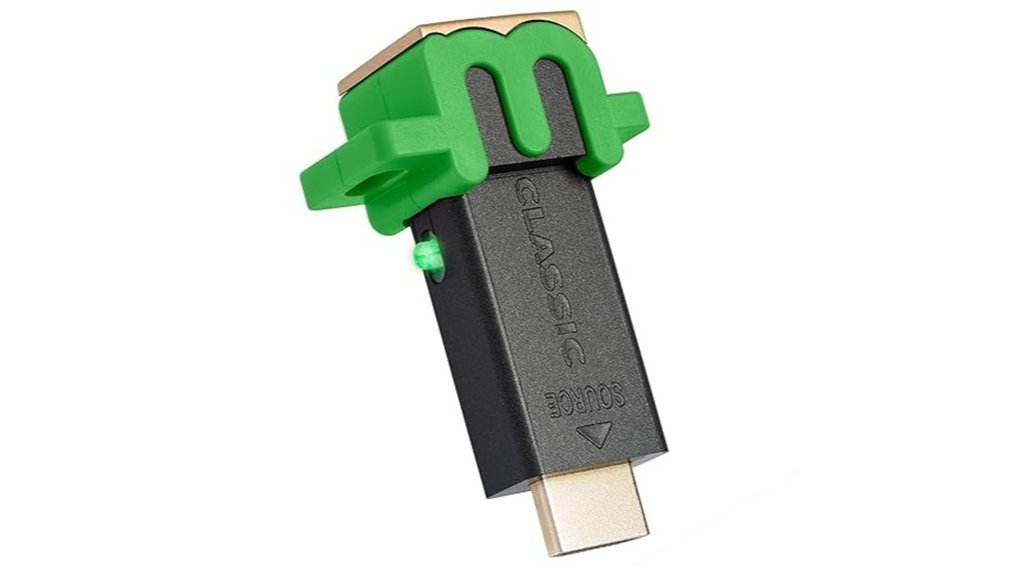
If you want sharp retro visuals on a modern TV, this box pulls its weight. I plugged the Marseille mClassic Retro Edition into my setup and saw the change fast. Edges looked crisp. Colors felt richer. It felt like wiping dust off an old cartridge.
Setup stays simple. You connect it between your console and TV. Then you power it with USB. It supports classics from NES through original Xbox. Output climbs to 1440p at 60Hz. That jump makes pixel art pop without stretching your 4 to 3 frame.
You get three modes to tune the vibe. Retro mode sharpens while keeping that square look. Vintage mode adds soft glow and warm tones like a CRT. Vintage Enhance tightens that effect for a cleaner finish. I liked switching modes mid game. It felt like swapping lenses on the fly.
Gameplay stays smooth. I felt zero delay in Game Mode. Button presses landed right on cue. Fast games like fighters and shooters stayed snappy. The device runs cool and silent too.
Keep one thing in mind. Older consoles need an HDMI adapter. Once set, it runs like a well oiled machine.
Best For: Retro fans who want *clean visuals* on modern screens while keeping that classic 4 to 3 feel with smooth response.
Pros:
- Boosts image clarity up to 1440p at 60Hz with authentic aspect ratio
- Three display modes with CRT style glow and color tuning
- Smooth performance with responsive input in Game Mode
Cons:
- Needs an HDMI adapter for older systems
- Uses USB power which adds one more cable
- Gains feel subtle on modern HDMI consoles
Mcbazel ODV-GBS-C Scan Converter RGBS/SCART to HDMI/VGA
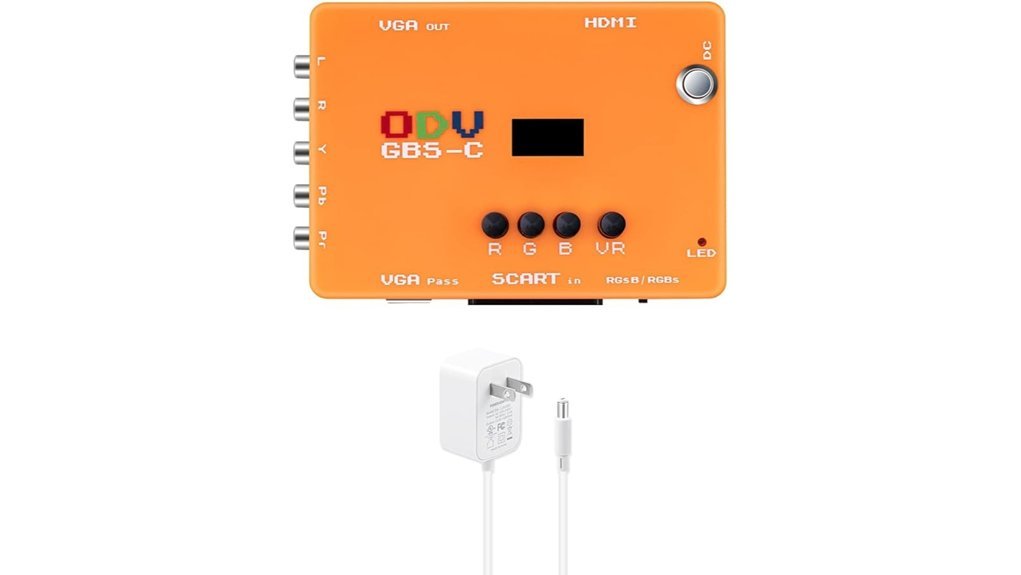
A zero lag scan converter like the Mcbazel ODV GBS C turns a flat panel into a retro playground. I hooked it up and the image snapped into place like a clean arcade PCB. You feed RGBS or SCART or YPbPr or VGA, and it pushes out clean HDMI or VGA with crisp edges. Motion feels tight and sound stays in sync.
It handles 240p and 480i and 480p with smart deinterlacing. Fast motion looks steady instead of jittery. You can add scanlines for that soft CRT glow, like a warm tube humming in a dark room.
Control feels hands on. I twist the RGB knobs and see color shift in real time. Front buttons work fast and WiFi control feels slick. Firmware updates run through USB. A 3.5 mm jack carries audio with clear output.
Compatibility covers many classic consoles. Plan for an extra converter with N64 and GameCube. Keep sources at 60 Hz for best results. Think of it like tuning a guitar, once set it sings.
Best For: Retro gamers who want sharp video on modern LCDs with tight timing and rich control.
Pros:
- Near zero input lag for precise play
- Wide input support, RGBS SCART YPbPr VGA
- Clean HDMI and VGA output with sharp scaling
- Scanlines and RGB knobs add visual flavor
- WiFi control and USB updates feel modern
Cons:
- Focus stays on RGB and component signals
- N64 and GameCube setups benefit from an added converter
- Works best with standard 60 Hz sources and common resolutions
Retro 8-Bit Game Console with 620 Games
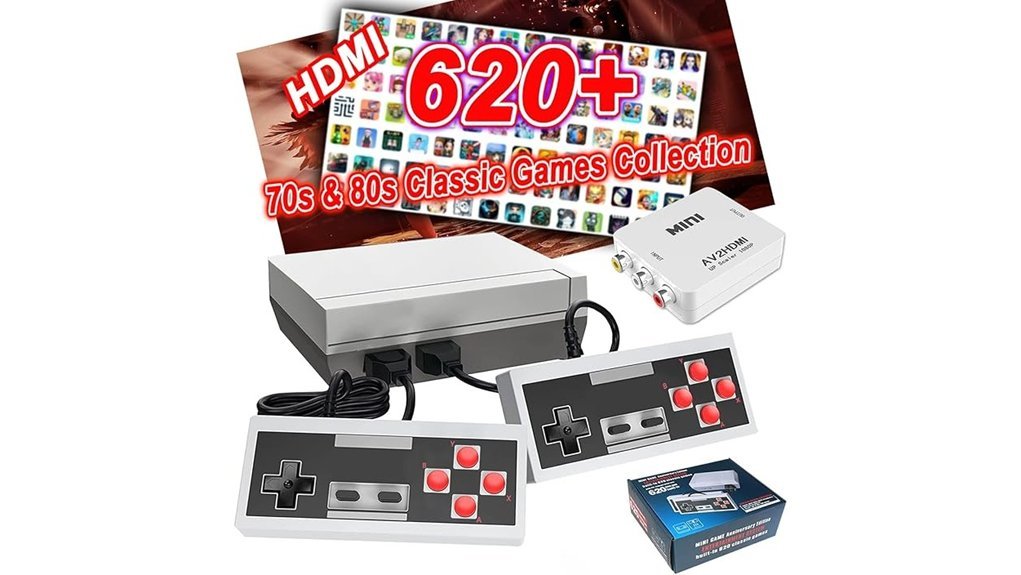
Two ports keep things simple. I tested HDMI on a 4K TV and AV on a CRT. The console boots fast and drops you into play in seconds. You get 620 built in 8 bit games across action and puzzle and racing. It feels like a candy jar for retro fans.
The plastic shell feels light in hand. The buttons click with a soft snap. I hear that classic beep as games load. The simple controls mirror old NES pads so your thumbs adapt fast. Two controllers come in the box so you and a friend can jump in right away.
Picture quality shifts by screen. On a CRT the pixels blend and glow. It feels warm like a Saturday morning cartoon. On a modern LCD the image looks softer and a bit blocky. You still get smooth play and quick response.
Setup takes a minute. Plug in power and video and you are set. The first controller acts as the main input so keep it close. Think of it as the driver seat in a two seat car.
Best For
Retro fans and families who want fast plug and play fun on modern TVs or classic CRTs. It hits the sweet spot like a mixtape of old hits.
Pros:
- Huge library of 620 built in games for instant variety
- HDMI and AV support fits modern TVs and CRT screens
- Two controllers included for easy couch co op
Cons:
- Image looks softer on HD screens
- First controller serves as primary input
- Library includes repeats and some lesser known titles
Hyperkin RetroN 3 HD Retro Console (M03888-SB)
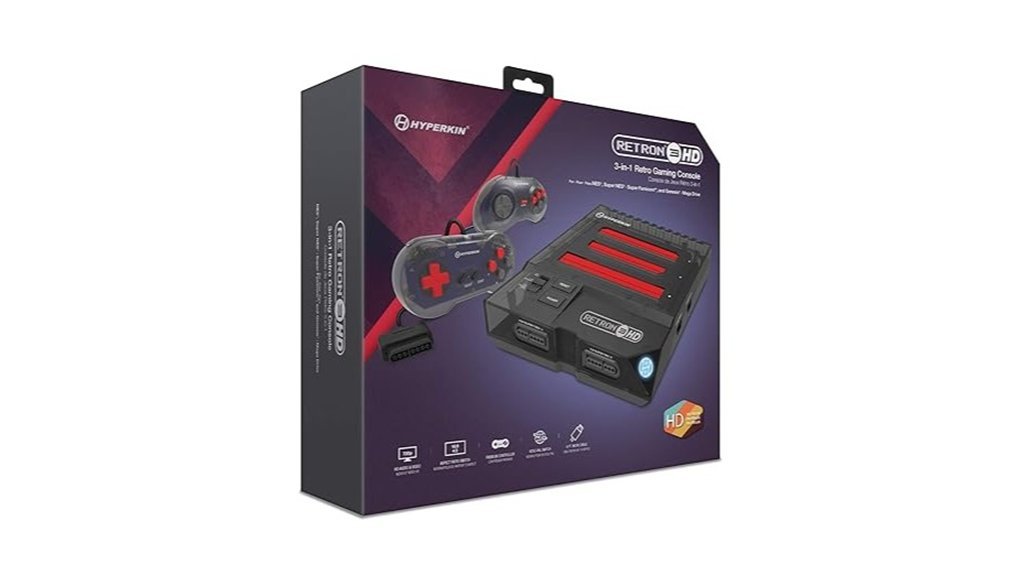
Players who want one console for *classic cartridges* get real value with the Hyperkin RetroN 3 HD. I’ve used it on both a flat screen and a CRT. It feels like a bridge between eras. You slot in NES, SNES, Super Famicom, or Genesis carts and you’re playing in seconds. No fuss. Just power on and go.
You get 720p HDMI output that looks sharp on modern TVs. Colors pop and edges stay clean. You also get AV output for that warm CRT glow. I still hear the soft buzz of scanlines on my old tube set. It hits like a time machine. Stick with *4:3 mode* for the right shape. Your games look as they should.
Setup feels easy. It’s plug and play right out of the box. The included controllers feel light in hand. Buttons click with a soft snap. I prefer original pads for that familiar grip. Good news, they work here. Add an EverDrive and your library grows fast. It feels like having a whole shelf in one slot.
This console fits collectors who want less clutter and more play time. It’s a Swiss army knife for retro fans.
Best For: Retro gamers who want one system for NES, SNES, Super Famicom, and Genesis carts with modern TV support.
Pros:
- Plays four classic systems in one compact unit
- HDMI output at 720p plus AV for CRT use
- Works with original controllers and EverDrive carts
Cons:
- LCD image feels clean rather than nostalgic
- 16:9 mode stretches the picture shape
- Pack-in controllers feel lighter than originals
Tiny Arcade Atari 2600 Mini Console with Games
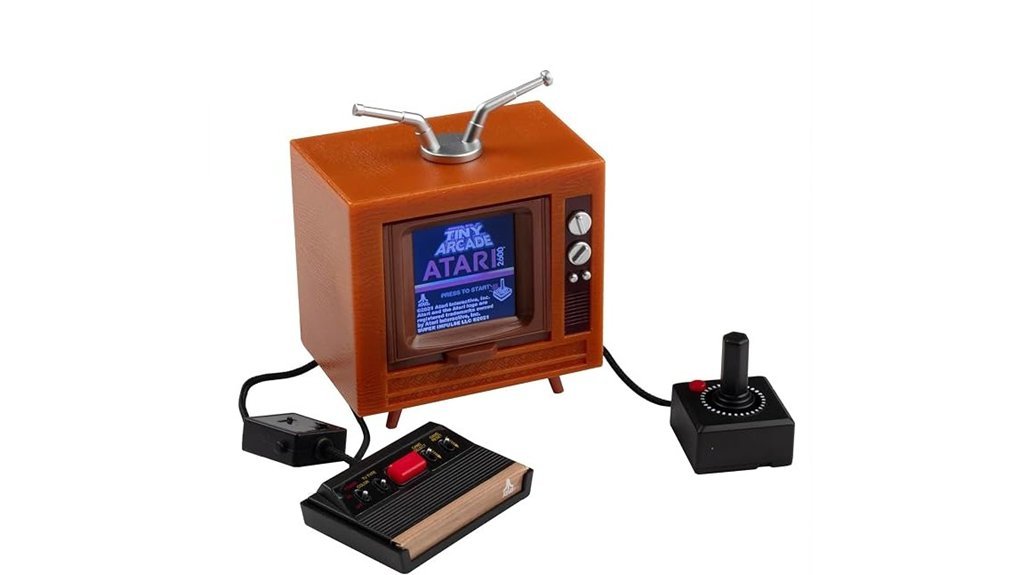
Anyone craving portable nostalgia will love the Tiny Arcade Atari 2600 Mini Console. I tested it on a flight and it felt like a time capsule in my hands. The plastic shell has that old school texture. The joystick clicks with a soft snap. It instantly took me back.
You get a 3.5 inch replica with a working joystick and a 1.5 inch color screen. The screen looks tiny yet sharp. Colors pop like a vintage arcade sign. Sound comes through with that classic Atari buzz. It feels like a pocket arcade that hums to life.
It ships with ten classic Atari games like Pac Man and Pong. I tapped play and jumped right in. No setup. No waiting. It is as easy as flipping a light switch.
You can toss it in your bag and go. It runs on AAA batteries so you stay free from cables. I played it at a park bench and it drew curious looks. This little console punches above its weight.
It suits kids and adults. It works as a shelf piece or a quick play fix. You get a faithful slice of Atari history in your pocket. Small size. Big memories.
Best For:
Retro gaming fans who want a quick hit of nostalgia anywhere. Collectors who enjoy display worthy mini gear. Casual players who like simple pick up and play fun.
Pros:
- Real retro feel, the joystick clicks and games feel authentic
- Ultra portable size, easy to carry and display anywhere
- Instant play, preloaded games with zero setup
Cons:
- Tiny screen, long sessions feel tight on the eyes
- Limited game list, ten titles cap the variety
- Battery powered, you need AAA batteries on hand
3000 Game Arcade System Jamma PCB HDMI Compatible
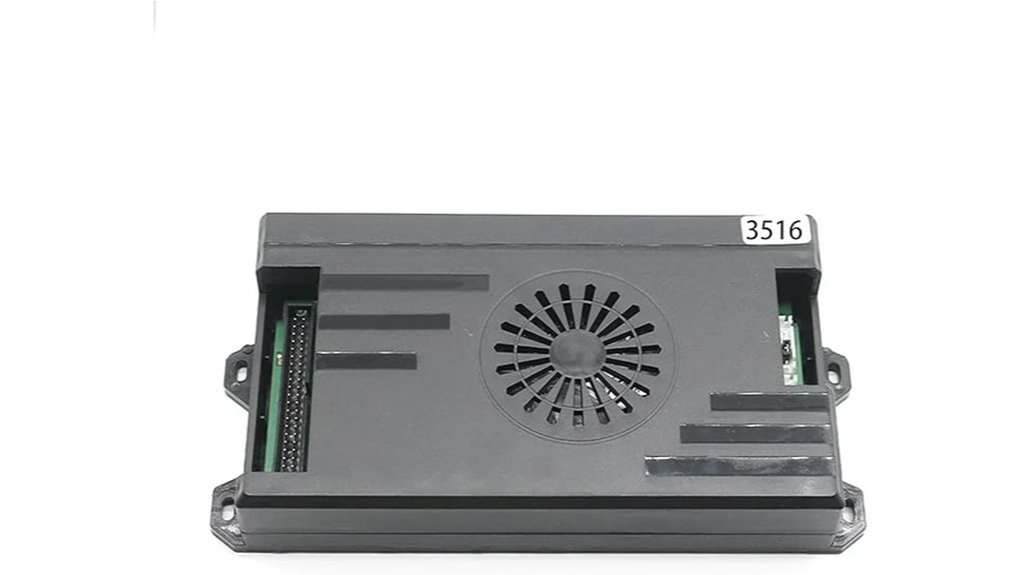
If you want a plug and play arcade hub, I’ve run this JAMMA PCB and it fires up fast. You hit power and hear that crisp menu beep. Feels like a coin door just clicked. You get 3000 horizontal games and 516 vertical titles. I jump between favorites and recent lists in seconds. Think of it as a jukebox for pixels.
It hooks to CRT, VGA, or HDMI. I swapped from warm scanlines to clean 720p in minutes. The image stays sharp and colors pop. An external USB controller feels tight in hand. You can host four players and the room gets loud fast. You can pause and exit with one tap. Screen flip takes seconds for vertical shooters. High score tracking keeps bragging rights alive. Setup stays simple so you play more.
Best For: Retro fans and cabinet builders who want a big plug and play library with flexible display and local multiplayer.
Pros:
- Huge library with 3000 plus horizontal and 500 plus vertical games
- Works with CRT VGA and HDMI at 720p for classic or modern screens
- Supports four players with pause exit and high score saves
Cons:
- Game curation varies so quality can feel mixed
- 720p looks clean yet modern panels crave higher resolution
- Menus feel basic though they stay quick and clear
The C64 Mini USA Version
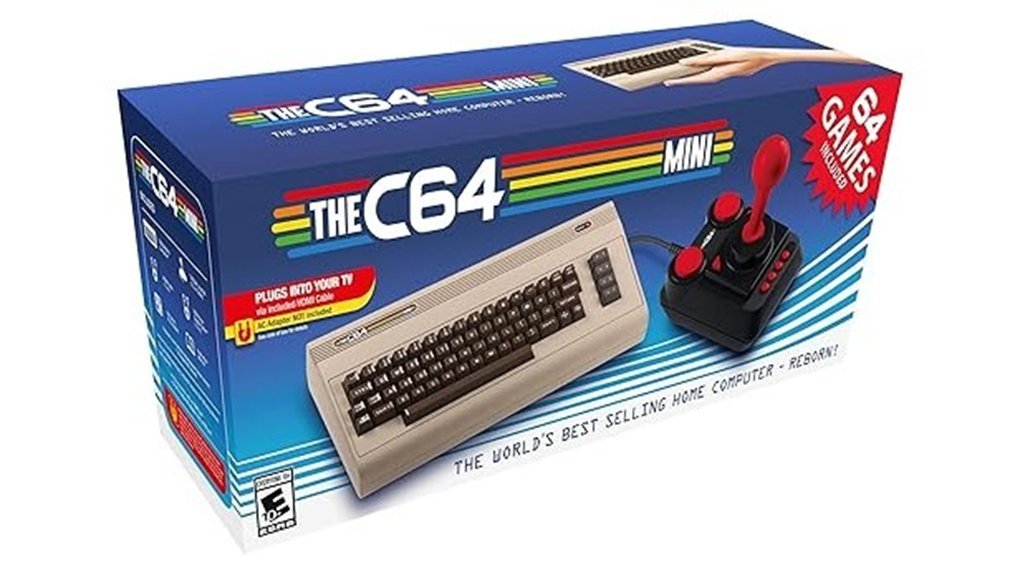
Two display modes pull you straight into the past. I flipped between US and Europe modes in seconds. *Pixel Perfect output* keeps edges crisp and clean. CRT filters add that soft glow you remember. It feels like warm glass under old arcade lights.
You get 64 preinstalled games ready to fire up. I heard that classic SID sound chip hum through my speakers. The USB joystick responds fast and feels light in hand. Save states keep your progress tight and simple. No lost runs. No stress.
Plug in a keyboard and you tap into full C64 control. I tested BASIC commands and it worked smoothly. Add a second joystick for couch battles. Dual USB ports handle it all with ease. Updates load from a flash drive in minutes. It’s smooth as butter from box to boot.
Best For:
Retro fans who want a compact Commodore 64 with modern display tweaks and quick setup.
Pros:
- *Display modes* and Pixel Perfect visuals look sharp and true
- CRT filters add that soft retro glow
- 64 games come ready to play with save states
- USB support expands control with keyboard and extra joystick
Cons:
- Game library stays fixed without manual additions
- Joystick feels light compared to classic sticks
- Full typing needs an external keyboard
Tech Snapshot:
- HDMI output at 720p
- Dual USB ports for peripherals
- Firmware updates via USB drive
- Compact mini console design
It hits that sweet spot like a favorite old song on vinyl.
Hyperkin RetroN GX TurboGrafx-16 HD Console
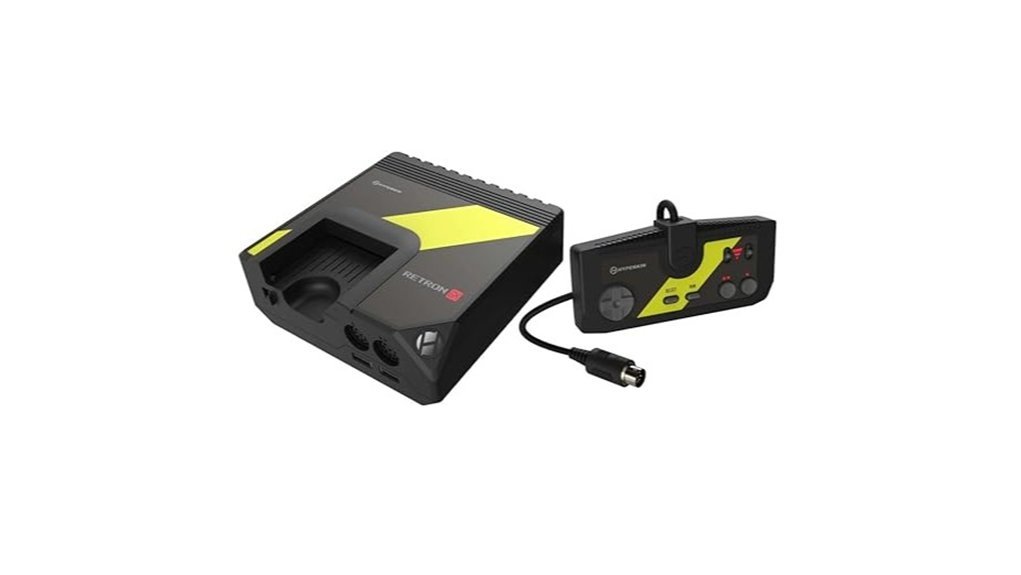
RetroN GX hits like a time capsule. I slid in a HuCard and heard that soft click. Then bright pixels popped on my HDTV in seconds. You get 720p over HDMI with zero hassle. Swap between 4:3 and 16:9 on the fly. Add scanlines for that warm glow. Try black and white or smoothing for softer edges. It feels like a familiar tune on a new speaker.
I leaned on rewind during tough stages. You can jump back up to twelve points. Quick save keeps your run alive anytime. That safety net feels like a second life. The wired controller responds fast and firm. The plastic shell feels smooth and cool in your hands. The unit sits small and clean at 2.1 pounds. Built in 4 GB storage keeps things tidy. Picture stays crisp on LCD panels in a bright living room.
It won’t mirror a CRT perfectly. You still get a sharp modern look that many players enjoy. I see this as convenience first. You plug in and play. No fiddling.
Best For: You want an easy way to run original TurboGrafx 16 or PC Engine carts on a modern HDTV with handy extras.
Pros:
- Plays original HuCard and PC Engine carts with simple HDMI setup
- Rewind and quick save keep progress safe and fun
- Filters and aspect options shape the image to your taste
Cons:
- Authentic CRT feel stays out of reach
- Wired controller keeps you close to the screen
- 720p output looks clean yet stops short of full HD
Key Specs:
- Output: *720p HDMI*
- Media: *TurboGrafx 16 HuCard and PC Engine cards*
- Features: *rewind up to twelve points, quick save, scanlines, smoothing, black and white*
- Storage: *4 GB built in*
- Weight: *2.1 pounds*
Old Skool Classiq 2 HD – Black/Red
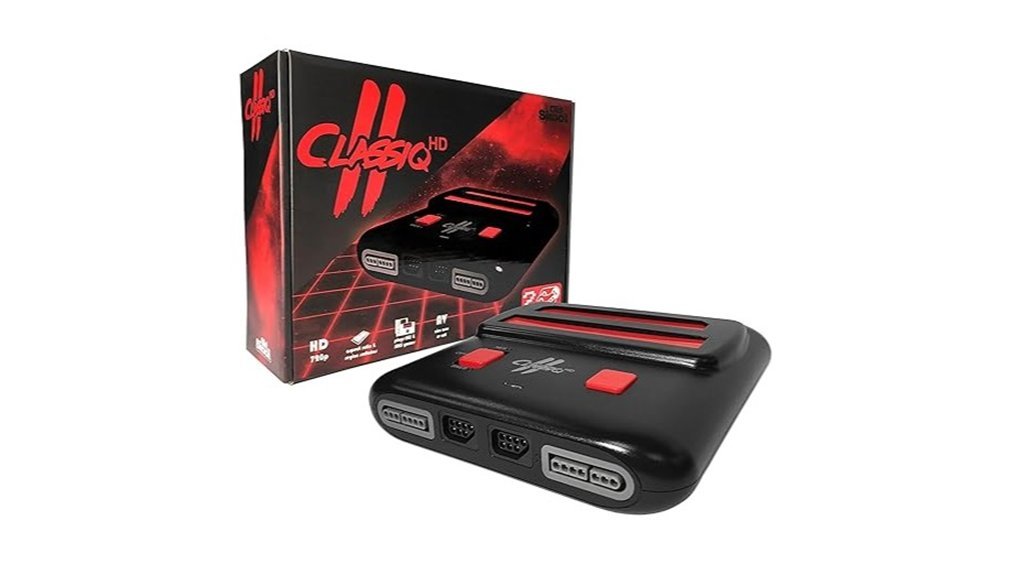
Gamers who want quick HDMI play on modern TVs will feel right at home with the Classiq 2 HD. I plugged in a Super Nintendo cart and heard that classic click. It feels like sliding a tape into a deck. You get a lightweight, sturdy console that outputs at 720p or 1080p. Setup takes seconds. You plug in HDMI and power on. Done.
Gameplay starts fast. No menus. No fuss. Just pure cartridge action. The two included controllers feel light in hand. Buttons give a soft click and respond well. You can jump into multiplayer right away. The black and red shell looks sharp on a shelf. It blends retro vibes with a modern touch.
On LCD screens, visuals look clean and bright. Sprites appear crisp and clear. You will notice the lack of CRT softness. Lines look sharper than memory. Think of it like hearing a remastered track. Clear but different. Still, for convenience and affordability, it delivers a smooth ride.
Best For: You want an easy and affordable way to play original Super Nintendo cartridges on modern HDMI TVs with fast setup.
Pros:
- Simple HDMI hookup with 720p or 1080p output
- Works with original SNES cartridges for quick plug and play
- Two controllers included for instant multiplayer fun
Cons:
- Sharp visuals change the classic CRT look
- Build feels light in hand over long sessions
- Performance varies across some units
Atari Flashback 12 Gold Retro Console with Controllers
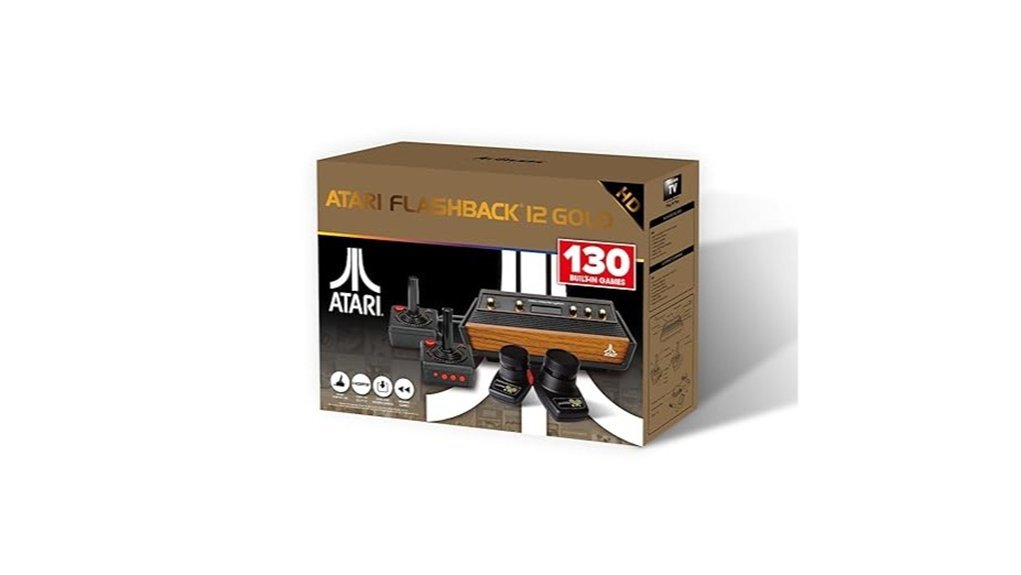
If you want plug and play nostalgia, I’ve run this on a modern LCD and it feels easy from the first click. You get 130 built in classics like Asteroids and Centipede and Pitfall and River Raid. The image comes through HDMI at 720p and looks clean on flat screens. I hear crisp beeps and bloops that take me straight back. The plastic sticks feel light in hand and give that old arcade vibe.
You can save load and rewind so tough spots feel fair. I tap rewind and fix a bad move in seconds. Setup takes minutes and the Micro USB power keeps it simple. I updated firmware and the system felt smooth right after. Picture and sound feel like a polished throwback. Think of it as a time capsule that fits in your palm.
Best For: Casual players and retro fans who want quick access on a modern TV.
Pros:
- 130 classic Atari games ready to play with zero setup
- HDMI 720p output fits today’s TVs with ease
- Save load and rewind make games feel friendly
Cons:
- Wired controllers keep you close to the screen
- Video and audio favor modern clarity over CRT texture
- Joystick feel leans firm and precise over loose and floaty
Factors to Consider When Choosing CRT vs LCD for Retro Gaming
I’ve run both CRT and LCD setups for years, and you feel the difference the moment you power on. The CRT hums and warms your hands. The LCD stays cool and sharp. Pick your lane fast.
Display feel
*CRT gives you pure retro vibes.* Colors glow and scanlines dance. Motion feels like butter. Old consoles snap into place.
*LCD looks clean and crisp.* Pixels sit still and bright. You get modern clarity. Some games feel a touch too smooth.
Input response
You want tight control. I feel it in fast platformers.
- CRT reacts instantly. Your button press lands on cue.
- LCD adds delay in many panels. Gaming modes help a lot.
Resolution handling
Old systems speak low resolution.
- CRT loves 240p and 480i. No scaling fuss.
- LCD needs scaling. Good scalers keep edges clean.
Setup effort
Here is where sweat meets steel.
- CRT setup feels simple. Plug in and play.
- LCD setup asks for tweaks. You dial settings and maybe add a scaler.
Upkeep and space
Think long term and your living room.
- CRT carries weight and heat. It smells faintly warm after long sessions.
- LCD stays light and slim. It fits tight spaces with ease.
Quick call
I reach for CRT for *authentic feel*. I pick LCD for *convenience and clarity*. Choose the one that fits your space and play style. It is a game of inches.
Display Authenticity
Display Authenticity
I’ve tested both side by side. *CRTs pull you in fast.* LCD panels feel clean. CRT screens feel alive.
You get natural scanlines that blend pixels like paint. Colors melt together in a soft glow. It feels like warm light through glass. LCD pixels sit sharp and rigid. The image feels sliced.
*CRTs carry the soul of retro games.* Developers built visuals for this exact look. You see shadows soften. Edges blur just right. It clicks into place like a key in a lock.
Aspect ratio matters. CRTs show true 4:3 framing. You see the full scene as intended. No stretch. No crop. Just the full picture.
Low resolution shines here. CRTs smooth rough edges with ease. Pixels stay tight and cohesive. LCD screens expose every block. That harsh grid stands out.
There’s also the feel. A faint hum. A soft flicker. A gentle screen glow on your face. It hits like stepping into an old arcade. That’s the hook.
Why CRT still wins for authenticity
- Natural scanlines and pixel blending
- Warm color depth with subtle glow
- True 4:3 image presentation
- Smooth handling of low resolution content
- Light flicker that adds motion feel
If you care about original intent, CRT delivers the real deal. It keeps the era intact. It shows games as they lived and breathed.
Input Lag Differences
Input Lag Differences
Timing drives feel. You notice it the second you press a button. I’ve tested both on real setups. The gap feels like night and day.
On a CRT, input hits fast. You press and the screen reacts in about 1 to 2 milliseconds. It feels *snappy*. You hear the click and see the action almost at once. That tight loop pulls you in.
LCD panels add delay. Most sit around 10 to 30 milliseconds. You feel that drag in your thumbs. Fast jumps feel late. Combos drop.
Game Mode helps. It trims extra processing. Still, some delay stays. The image looks clean, yet the timing feels soft.
CRTs refresh quickly. Many run at 60Hz or higher. Motion looks smooth. Blur stays low. Your eyes track action with ease.
LCD motion can smear a bit. Fast scenes feel less sharp. That adds to the lag feel. Like running in sand.
If you play fighters or platformers, this matters. Tight windows demand fast response. On a CRT, inputs map to action right away. It feels like your brain plugs straight into the game.
Quick spec snapshot:
- CRT input lag, about 1 to 2 ms
- LCD input lag, about 10 to 30 ms
- Refresh rate, often 60Hz or more
- Motion clarity, sharper on CRT
Bottom line. CRT keeps timing crisp. LCD adds a small cushion. That gap can make or break a run. Like trying to clap on beat with a tiny echo.
Resolution Compatibility
Resolution Compatibility
I’ve tested both screens side by side, and the difference hits your eyes fast. A CRT feels like a warm vinyl record. You see soft glow and hear that faint hum.
With a CRT, you get _native 240p and 480i_. Games snap into place. Pixels look right. Scanlines appear naturally and add texture you can almost feel.
LCD panels push higher counts like 640×480 or 1280×1024. You gain crisp edges. The image looks clean and bright. Scaling steps in to fit older signals, and that can smooth fine detail.
Both screen types keep a _4:3 aspect ratio_. Characters stay proportional. Circles stay round.
Modern inputs shine on LCDs. I plug in 720p or 1080p with ease. You can tweak brightness and contrast on the fly. Colors pop more under strong light.
To match that CRT vibe on LCD, you add filters or extra gear. These tools draw scanlines and soften edges. The result feels closer to classic output.
Here’s the quick read I use in the field:
- CRT: native 240p and 480i, true scanlines, zero scaling
- LCD: higher resolutions, flexible inputs, adjustable image
- CRT: softer glow, authentic look, simple setup
- LCD: sharper picture, modern support, needs filters for retro feel
If you want plug and play nostalgia, CRT wins. If you want flexibility and sharpness, LCD takes the lead.
Installation Complexity
Installation Complexity
I’ve set up both types, and you feel the difference fast. A CRT feels like lifting a small safe. The glass hums and the shell runs warm. You plan every move like a game of Tetris.
You deal with real weight. You pick sturdy furniture. You place it with care. The deep case eats desk space. Tight rooms need smart layout. Old ports may push you to find special cables. Each step takes time. It’s a slow burn.
LCD setup feels light and quick. You lift it with one hand. The panel stays cool to the touch. You mount it or drop it on a stand in minutes. Most ports sit ready on the back. You plug in and play.
Here’s the quick view:
- CRT setup
- Heavy build and deep body
- Extra cables may come into play
- Careful placement on solid furniture
- LCD setup
- Slim frame and light weight
- Built in ports for fast hookup
- Easy wall mount or desk stand
I spend less time wiring with LCD. I jump into games faster. CRT asks for patience and a plan. LCD keeps it simple and smooth.
Maintenance Requirements
Maintenance Requirements
I’ve used both for years. You feel the difference fast.
CRT care feels like tending an old car. It hums and warms the room. Dust sticks to the glass and vents. You wipe and vacuum often. Colors drift, so you run degaussing now and then. Burn in leaves faint ghosts on the screen. Parts like tubes and capacitors cost more and take time to find. The unit feels heavy in your hands. Moving it for cleaning tests your back. Over time the phosphor dims, so colors lose their pop. *It’s a slow fade you can see.*
LCD care stays simple. The panel feels cool and light. You grab a cloth and wipe the screen. That is most of the job. Parts stay easy to source and swap. The image stays steady for years. You get *set it and forget it* vibes.
Quick take
- CRT, more hands on care and tuning
- LCD, light cleaning and steady output
- CRT, heavier and harder to move
- LCD, lighter and easy to handle
- CRT, parts cost more and take effort
- LCD, parts stay common and affordable
Bottom line
Pick CRT if you enjoy tinkering. Pick LCD if you want quick upkeep and consistent performance.
Visual Enhancement Options
Visual Enhancement Options
I’ve tested both display types side by side. The difference hits your eyes fast. CRT screens glow with a warm hum. You see scan lines right away. Motion feels smooth and soft. Colors pop like fresh paint. You plug in and play. It feels like slipping on a worn leather glove.
LCD panels give you control. You tweak the image to taste. Menus offer scan line filters and sharpness sliders. Color settings let you chase that retro look. I’ve pushed these settings for hours. You can get close to CRT vibes with patience.
Here’s what you can adjust on most LCDs:
- Scan line filters, adds that classic stripe look
- Sharpness control, softens harsh edges
- Color profiles, shifts tones to warmer hues
- Brightness and contrast, balances light and depth
Add an upscaler and things tighten up. The image looks cleaner on a modern panel. Aspect ratio stays correct. Pixels stop stretching. The picture feels crisp yet still nostalgic. It’s like tuning a guitar by ear. You land on a sound that feels right.
Space And Weight
Space And Weight
I’ve hauled both types across rooms, your back feels the truth fast. A CRT feels like lifting a small safe. The glass is cool and heavy in your hands. It hums softly when it powers on.
A 19 inch CRT can push past 50 pounds. You plan your setup like a game of Tetris. Depth eats your desk space whole. You need a solid stand or a cabinet that won’t wobble.
LCDs feel like a breath of fresh air. I can lift one with one hand. The plastic feels light and smooth. Most sit near 8 pounds, easy work.
You gain real flexibility here.
- Wall mount options open up tight rooms
- Small desks handle the load with ease
- Clean cable routing keeps things tidy
*Think of it like trading a brick for a notebook.*
If you move gear often, you save time and effort. Setup shifts feel quick and painless. Your room stays open and easy to manage. You also get a larger screen without the bulk, that balance makes daily use feel simple and comfortable.
Conclusion
You stand in a dim room. I’ve tested both screens for years. Your hands feel the warm plastic of a controller. The choice hits like a fork in the road.
CRT gives you glow and motion that feels alive.
Scanlines ripple across the glass. You hear a soft hum like an old fridge. Colors bleed in a pleasing way. Fast action stays smooth. It feels like butter on warm toast.
LCD gives you sharp pixels and clean edges.
The panel looks bright and crisp. Text pops with clear lines. You see every detail in sprites. It feels like a fresh coat of paint.
Here’s how they stack up in real use:
- CRT strengths
- Zero input lag feel
- Natural motion blur for 240p games
- Deep blacks and soft light
- LCD strengths
- Sharp pixel clarity
- Easy setup with modern gear
- Lightweight and compact
I notice CRT wins for classic consoles like SNES and Genesis. Games feel right in motion. LCD suits HDMI mods and modern ports. You gain clarity and convenience.
Your pick shapes the experience.
CRT wraps you in nostalgia and glow. LCD delivers precision and ease. Pick the screen that makes you want one more level.